Showing posts with label bluetooth. Show all posts

10/31/17

Announcing Fast Pair - effortless Bluetooth pairing for Android


Posted by Ritesh Nayak M and Ronald Ho, Product Managers


Today we're announcing Fast Pair, a hassle-free process to pair your Bluetooth
devices on all supported Android devices running Google Play services 11.7+ with
compatibility back to Marshmallow (Android 6.0). Fast Pair makes discovery &
pairing of Bluetooth devices easy and is currently rolling out to Android 6.0+
devices. You can try this out with Google Pixel Buds
or Libratone's
Q Adapt On-Ear
, Bose® QuietComfort 35 II, and soon on Plantronics Voyager 8200 series wireless headsets.
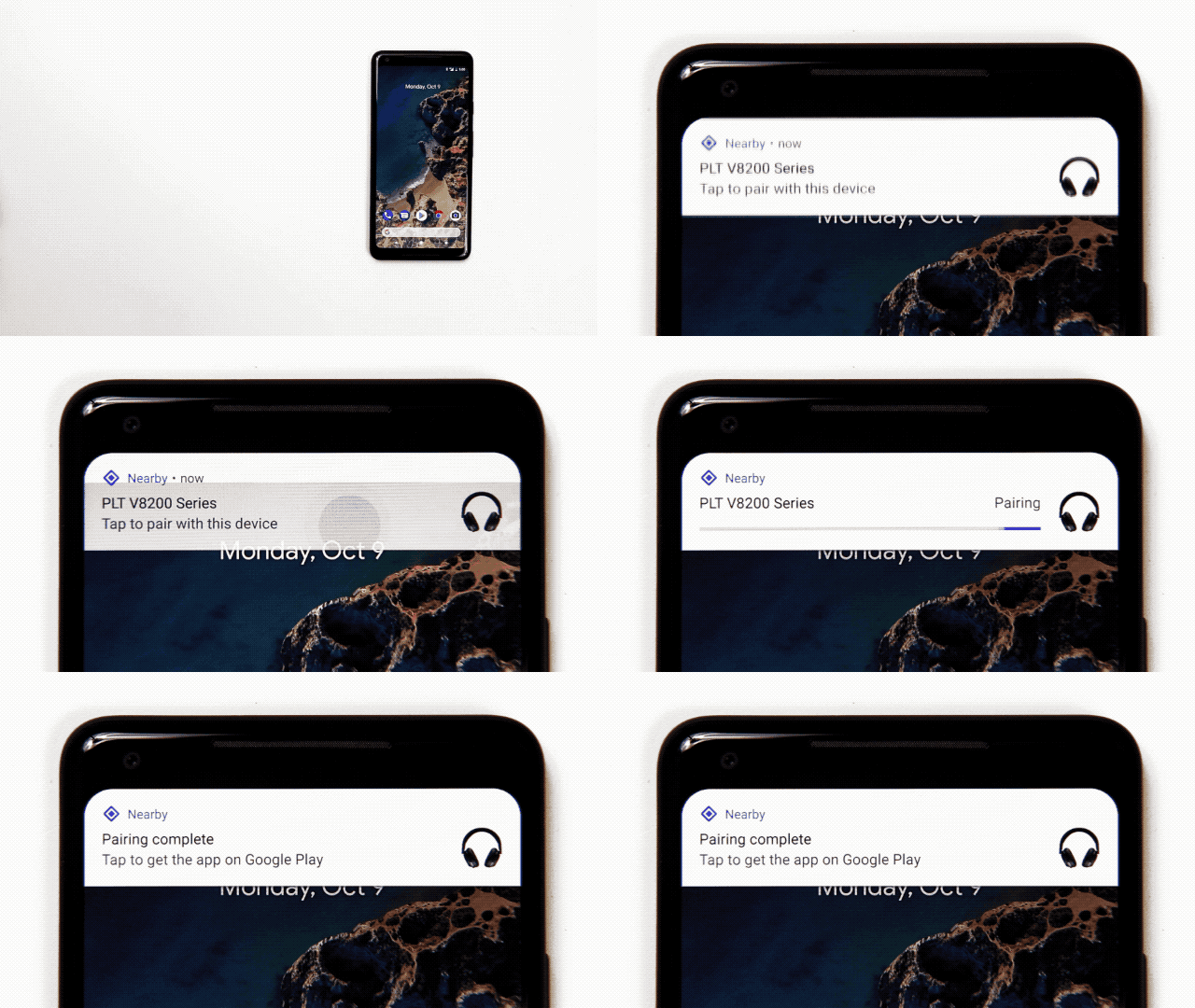


Ease of use, speed and security are the design principles driving the Fast Pair
specification. Fast Pair uses BLE (Bluetooth Low Energy) for advertising and
discovery and uses classic Bluetooth for pairing. Here's what a Fast Pair flow
looks like:


  1. Turn on a Fast Pair-enabled device and put it in pairing mode.

    • Android scans for BLE broadcasts in close proximity of the user's phone and
      discovers a Fast Pair packet (provided Bluetooth and Location is turned on).

    • This packet is sent to our servers to get back the device's product image,
      product name and companion app (if there is one).


  2. The user receives a high priority notification asking them to "Tap to pair" to
    the device. The notification contains the product name and image.

  3. When the user taps on the notification, we use classic Bluetooth to
    establish a connection.

  4. A success notification is shown which contains a link to
    download the companion app (if there is one).


Imagine doing all of this without ever fumbling with Bluetooth settings. Users get a seamless and secure pairing
experience and confidence that they're connecting to the right product.
Manufacturers get their brand, device name and companion app in front of the
users.


Thanks to a couple of our partners who have been instrumental in prototyping and
testing this spec, and whose feedback has been invaluable to the Fast Pair
effort. If you are a Bluetooth accessory manufacturer and want to adopt Fast
Pair for your device, please reach
out to us
.


Plantronics is an audio pioneer and a global leader in the communications
industry. From Unified Communications and customer service ecosystems, to data
analytics and Bluetooth headsets, Plantronics delivers high-quality
communications solutions that customers count on today, while relentlessly
innovating on behalf of their future. For more information visit plantronics.com


Libratone is on a mission to liberate sound and to expand peoples'
experiences with music in the era of streaming. Founded in 2009 in Denmark,
Libratone is one of the first audio companies to consider the aesthetics of
speakers – to move them out of the corner of the room and into the center and
onward, for the consumer on the move. For more information visit libratone.com


Read more

7/31/17

Announcing Nearby Connections 2.0: fully offline, high bandwidth peer to peer device communication


Posted by Ritesh Nayak M, Product Manager


Imagine walking into a hotel room and having the temperature set just right,
your favorite sub-genre of progressive-math-rock playing in the background, and
the TV urging you to continue binging on your saved guilty-pleasures watchlist.
What if your phone's contact book could expand to merge with your spouse's when
you're together, so you're never again put in the excruciatingly compromising
position of having to ask for your mother-in-law's phone number (which you ought
to have had on speed dial, in your favorites, and listed as an emergency
contact)? Now imagine a world where you can drive up to an empty driveway or
private parking space in a city like New York or San Francisco, and negotiate
with that space to rent it out until its owner returns.


The common thread among all these scenarios is being able to detect proximity to
-- and being able to communicate with -- people, places, and things "near" you.


At I/O this year, we spoke about a refresh to the Nearby
Connections
API that can provide high bandwidth, low latency, encrypted data
transfers between nearby devices in a fully-offline P2P manner. Today we're
announcing the availability of
this API
across all Android devices running Google
Play services 11.0
and up.


Nearby Connections uses WiFi, Bluetooth LE & Classic Bluetooth under the hood to
discover and establish connections to nearby devices. It abstracts away the
inherent complexity of these radios by leveraging the strengths of each, while
circumventing their respective weaknesses. Aside from the obvious advantage of
sidestepping the pain of dealing with the vagaries of these radios across
different OS versions and devices, this abstraction enables seamlessly upgrading
the bandwidth of a connection by switching between the radios as and when it
makes sense, as well as getting invisible over-the-air updates to use new radio
technology as it becomes available -- with no change whatsoever in the
application code.


At the heart of this API is a connection (with Unix-socket-like semantics) that
you can use to transfer bytes, files, or streams of data. There are two
supported connection topologies:


  • Star: Useful for creating 1:N topologies where there's a centralized device
    that others are especially interested in. For example, the host of an offline
    game, or the teacher's device in a classroom quiz app.

  • Cluster: Useful for creating M:N topologies that allow for creating looser
    mesh-like networks. For example, a classroom app that supports forming ad-hoc
    project groups for realtime collaboration, or an offline hyper-proximity-based
    chat app.


As a part of the process of building this API we worked with a few partners,
each with unique offline-data-transfer needs and environments. It's been great
to see what they've built on top of early versions of this API, and their
feedback has been invaluable in guiding us towards today's launch. Take a look
at some of the cool things they're building:


  • The
    Weather Channel
    is building on-demand mesh networks in data-deficient areas
    to spread urgent weather warnings.

  • Hotstar
    enables offline media sharing in places with spotty/no internet connectivity
    (like on public transportation, airplanes, etc.)

  • GameInsight
    is using Nearby Connections to not only find nearby players, but also to run
    entire games offline.

  • Android TV is building a remote control app (powered by Nearby Connections)
    to simplify initial setup, and to enable subsequent second screen experiences.


Now that the API is publicly available, we can't wait to see how you
will use Nearby Connections in your applications. To get started, visit
our developer
site
, check our code
samples
, and post any questions you have on Stackoverflow (tagged with google-nearby). To
stay up to date on the latest Android Nearby offerings (and our other
Context-related APIs), please subscribe to our mailing
list
.


Read more

4/7/17

Android Things Developer Preview 3


Posted by Wayne Piekarski,
Developer Advocate for IoT


Today, we are releasing the Developer Preview 3 (DP3) of Android Things,
bringing new features and bug fixes to the platform. This preview is part of our
commitment to provide regular updates to developers who are building Internet of
Things (IoT) products with our platform. Android developers can quickly build
smart devices using Android APIs and Google services, while staying secure with
updates directly from Google. The System-on-Module (SoM) architecture supports
prototyping with development boards, and then scaling them to large production
runs while using the same Board Support Package (BSP) from Google.


Android Bluetooth APIs


DP3 now includes support for all Android Bluetooth APIs in android.bluetooth
and android.bluetooth.le,
across all Android Things supported hardware. You can now write code that
interacts with both Bluetooth classic and low energy (LE) devices just like a
regular Android phone. Existing samples such as Bluetooth
LE advertisements and scanning
and Bluetooth LE
GATT
can be used unmodified on Android Things. We have also provided two new
samples, Bluetooth
LE GATT server
and Bluetooth audio
sink
.


USB Host support


Android version 3.1 and later supports USB
Host
, which allows a regular user space application to communicate with USB
devices without root privileges or support needed from the Linux kernel. This
functionality is now supported in Android Things, to enable interfacing with
custom USB devices. Any existing code supporting USB Host will work on Android
Things, and an extra sample USB Enumerator is available that demonstrates
how to iterate over and print the interfaces and endpoints for each USB device.


Feedback


Once again, thank you to all the developers who submitted feedback for the
previous developer previews. Please continue to send us your feedback by filing
bug
reports
and feature
requests
, and ask any questions on stackoverflow.
To download images for Developer Preview 3, visit the Android Things download
page, and find the changes in the release
notes
. You can also join Google's IoT
Developers Community
on Google+, a great resource to keep up to date and
discuss ideas, with over 4100 new members.


Read more

8/12/14

Cara Mengirim/Menerima Semua Jenis Format File Melalui Bluetooth ke/dari Ponsel Android

Pernah menghadapi masalah saat mengirim / menerima file melalui Bluetooth? Jika ya, kita sekarang memiliki solusi pemecahan masalah untuk hal yang sama. Sebagian besar pengguna mengeluh tentang tidak dapat menerima format file tertentu melalui Bluetooth. Masalah ini sering terjadi pada stock firmware bawaan, biasanya Anda menghadapi masalah dalam proses penerimaan/pengiriman file melalui Bluetooth dimana beberapa produsen memblokir beberapa jenis file tertentu untuk mengirim atau menerima. Nama aplikasi untuk mengatasi hal ini adalah "Xposed Repo".

Fungsi dan kegunaan Xposed Repo

Memungkinkan Anda untuk menerima hampir semua jenis file melalui Bluetooth,
Memungkinkan Anda untuk memilih jenis file yang ingin Anda terima
Memungkinkan Anda untuk memilih pemberitahuan saat menerima file yang masuk
Pada perangkat Samsung memungkinkan pengaturan Timeout menjadi tak terbatas

Semua hal di atas adalah mungkin untuk dikonfigurasi dengan bantuan sebuah aplikasi. Download aplikasi Xposed Repo pada perangkat Anda kemudian instal.

Setelah Anda membuka aplikasi, Anda akan melihat layar seperti gambar di bawah, setelah itu Anda dapat memilih file untuk dikirim.

alikasi android, bluetooth, mengirim fileaplikasi android, bluetooth, mengirim/menerima file

Anda kemudian harus memilih jenis file seperti yang terlihat pada gambar di bawah ini sehingga dapat dikirim melalui Bluetooth. Jadi, kini Anda dapat mengirim hampir semua jenis/format file melalui Bluetooth.

aplikasi android, bluetooth, mengirim/menerima file


Satu-satunya syarat untuk menggunakan aplikasi ini adalah Anda perlu memastikan bahwa perangkat telah di-root. Periksa menggunakan aplikasi Root Checker di Google Play Store untuk memeriksa apakah perangkat telah di-root atau belum. Jika belum, bisa melihat panduan untuk Rooting disini.

Read more
loading...