Showing posts with label Play Console. Show all posts

10/20/17

Playtime 2017: Find success on Google Play and grow your business with new Play Console features


Posted by Vineet Buch, Director of Product Management, Google Play Apps & Games


Today we kicked off our annual global Playtime series with back-to-back events in Berlin and San Francisco. Over the next month, we’ll be hearing from many app and game developers in cities around the world. It has been an amazing 2017 for developers on Google Play, there are now more than 8 billion new installs per month globally.
To help you continue to take advantage of this opportunity, we're announcing innovations on Google Play and new features in the Play Console. Follow us on Medium where presenters will be posting their strategies, best practices, and examples to help you achieve your business objectives. As Google Play continues to grow rapidly, we want to help people understand our business. That's why we're also publishing the State of Play 2017 report that will be updated annually to help you stay informed about our progress and how we’re helping developers succeed.
Apps and games on Google Play bring your devices to life, whether they're phones and tablets, Wear devices, TVs, Daydream, or Chromebooks like the new Google Pixelbook. We're making it even easier for people to discover and re-engage with great content on the Play Store.


Recognizing the best

We're investing in curation and editorial to showcase the highest quality apps and games we love. The revamped Editors' Choice is now live in 17 countries and Android Excellence recently welcomed new apps and games. We also continue to celebrate and support indie games, recently announcing winners of the Indie Games Festival in San Francisco and opening the second Indie Games Contest in Europe for nominations.


Discovering great games

We've launched an improved home for games with trailers and screenshots of gameplay and two new browse destinations are coming soon, 'New' (for upcoming and trending games) and 'Premium' (for paid games).


Going beyond installs

We’re showing reminders to try games you’ve recently installed and we’re expanding our successful ‘live operations’ banners on the Play Store, telling you about major in-game events in popular games you’ve got on your device. We're also excited to integrate Android Instant Apps with a 'Try Now' button on store listings. With a single tap, people can jump right into the app experience without installing.


The new games experience on Google Play
The Google Play Console offers tools which help you and your team members at every step of an app’s lifecycle. Use the Play Console to improve app quality, manage releases with confidence, and increase business performance.


Focus on quality

Android vitals were introduced at I/O 2017 and already 65% of top developers are using the dashboard to understand their app's performance. We're adding five new Android vitals and increasing device coverage to help you address issues relating to battery consumption, crashes, and render time. Better performing apps are favored by Google Play's search and discovery algorithms.

We're improving pre-launch reports and enabling them for all developers with no need to opt-in. When you upload an alpha or beta APK, we'll automatically install and test your app on physical, popular devices powered by Firebase Test Lab. The report will tell you about crashes, display issues, security vulnerabilities, and now, performance issues encountered.

When you install a new app, you expect it to open and perform normally. To ensure people installing apps and games from Google Play have a positive experience and developers benefit from being part of a trusted ecosystem, we are introducing a policy to disallow apps which consistently exhibit broken experiences on the majority of devices such as​ crashing,​ closing,​ ​freezing,​ ​or​ ​otherwise​ ​functioning​ ​abnormally. Learn more in the policy center.


Release with confidence

Beta testing lets trusted users try your app or game before it goes to production so you can iterate on your ideas and gather feedback. You can now target alpha and beta tests to specific countries. This allows you to, for example, beta test in a country you're about to launch in, while people in other countries receive your production app. We'll be bringing country-targeting to staged rollouts soon.

We've also made improvements to the device catalog. Over 66% of top developers are using the catalog to ensure they provide a great user experience on the widest range of devices. You can now save device searches and see why a specific device doesn't support your app. Navigate to the device catalog and review the terms of service to get started.


Grow your subscriptions business

At I/O 2017 we announced that both the number of subscribers on Play and the subscriptions business revenue doubled in the preceding year. We're making it easier to setup and manage your subscription service with the Play Billing Library and, soon, new test instruments to simplify testing your flows for successful and unsuccessful payments.

We're helping you acquire and retain more subscribers. You can offer shorter free trials, at a minimum of three days, and we will now enforce one free trial at the app level to reduce the potential for abuse. You can opt-in to receive notifications when someone cancels their subscription and we're making it easier for people to restore a canceled subscription. Account hold is now generally available, where you can block access to your service while we get a user to fix a renewal payment issue. Finally, from January 2018 we're also updating our transaction fee for subscribers who are retained for more than 12 months.


Announcing the Google Play Security Reward Program

At Google, we have long enjoyed a close relationship with the security research community. Today we're introducing the Google Play Security Reward Program to incentivize security research into popular Android apps, including Google's own apps. The program will help us find vulnerabilities and notify developers via security recommendations on how to fix them. We hope to bring the success we have with our other reward programs, and we invite developers and the research community to work together with us on proactively improving Google Play ecosystem's security.


Stay up to date with Google Play news and tips


How useful did you find this blogpost?

★ ★ ★ ★ ★


Read more

10/13/17

Introducing Android Instant Apps SDK 1.1


Jichao Li, Software Engineer; Shobana Ravi, Software Engineer


Since our href="https://android-developers.googleblog.com/2017/05/android-instant-apps-is-open-to-all.html">public
launch at Google I/O, we've been working hard to improve the developer
experience of building instant apps. Today, we're excited to announce
availability of the Android Instant Apps SDK 1.1 with some highly-requested
features such as improved NDK support, configuration APKs for binary size
reduction, and a new API to maintain user's context when they transition from an
instant app to the installed app.


Introducing configuration APKs


For a great instant app experience, app binaries need to be lean and well
structured. That's why we're introducing configuration APKs.


Configuration APKs allow developers to isolate device-specific resources and
native libraries into independent APKs. For an application that uses
configuration APKs, the Android Instant Apps framework will only load the
resources and native libraries relevant to the user's device, thereby reducing
the total size of the instant app on the device.


We currently support configuration APKs for display density, CPU architecture
(ABI), and language. With these, we have seen an average reduction of 10% in the
size of the binaries loaded. Actual savings for a given app depend on the number
of resource files and native libraries that can be configured.


As an example, a user on an ARM device with LDPI screen density and language set
to Chinese would then receive device-agnostic code and resources, and then only
get the configuration APKs that have ARM native libraries, the Chinese language,
and LDPI resources. They would not receive any of the other configuration APKs
such as the x86 libraries, Spanish language strings, or HDPI resources.


Setting up configuration APKs for your app is a simple change to your gradle
setup. Just follow the steps in our href="https://developer.android.com/topic/instant-apps/guides/config-splits.html">public
documentation.


Persistent user context after installation


On Android Oreo, the internal storage of the instant version of the app is
directly available to the installed version of the app. With this release of the
SDK, we are enabling this functionality on older versions of the Android
Framework, including Lollipop, Marshmallow, and Nougat devices.


To extract the internal storage of the instant app, installed apps can now call
href="https://developers.google.com/android/reference/com/google/android/gms/instantapps/InstantAppsClient#getInstantAppData()">InstantAppsClient.getInstantAppData()
using the Instant Apps Google Play Services API and get a ZIP file of the
instant app's internal storage.


Check out our href="https://github.com/googlesamples/android-instant-apps">code sample and
href="https://developers.google.com/android/reference/com/google/android/gms/instantapps/InstantAppsClient#getInstantAppData()">documentation
for more details on how to use this API.


Start building your Android Instant App


It's simple to start building your instant app on the latest SDK. Just open the
SDK Manager in Android Studio and update your Instant Apps Development SDK to
1.1.0. We can't wait to see what instant app experiences you build with these
new features.

Read more

8/18/17

500 million devices now supported for Android Instant Apps

Posted by Jonathan Karmel

Since our public launch at href="https://android-developers.googleblog.com/2017/05/android-instant-apps-is-open-to-all.html">Google I/O this year, we've been hard at work expanding the number of supported devices and the availability of instant apps, so that users can run your apps instantly, without installation. We're excited to announce that 500 million Android users now have access to instant apps across countries where Google Play operates.

A number of Google Play apps and games businesses across a range of industries have already started building with instant apps. Following the launch of their instant apps, they have seen strong results in engagement, acquisition and retention.

href="https://play.google.com/store/apps/details?id=com.vimeo.android.videoapp&hl=en_GB">Vimeo: WIth more than 50M creators and 240M viewers worldwide, Vimeo has built a platform whereby people can easily share videos with friends. The company wanted to implement Android Instant Apps to enable their audience to easily immerse themselves in content through a native app experience. Vimeo increased session duration by 130% with their instant app. href="https://developer.android.com/stories/instant-apps/vimeo.html">Discover how Vimeo drove increased engagement with their instant app.
href="https://play.google.com/store/apps/details?id=com.jet.jet.app&hl=en&e=-EnableAppDetailsPageRedesign">Jet: Based in the US, Jet provides a shopping platform, using a real-time savings engine to surface opportunities for customers to pay less. The company wanted to expand the reach of their existing app, and updated their app in order to support instant apps. Following the launch of their instant app, Jet found that their conversion rate increased by 27%. href="https://developer.android.com/stories/instant-apps/jet.html">Learn about how Jet launched their instant app.
href="https://play.google.com/store/apps/details?id=com.nytimes.crossword&hl=en_GB&e=-EnableAppDetailsPageRedesign">NYTimes Crosswords: The NYTimes Crosswords instant app provides users with crossword puzzles as printed in the New York Times daily newspaper. Their aim was to create a more native experience for their audience, increasing app engagement. Instant apps have 2x the number of sessions per user. Based on early results, they are also seeing more effective acquisition, conversion, and long term retention. Learn more about how NYTimes increased app sessions.
href="https://play.google.com/store/apps/details?id=com.dotloop.mobile&hl=en_GB&e=-EnableAppDetailsPageRedesign">dotloop: dotloop is a real estate transaction platform which makes it easier for real estate professionals to interact with home buyers and sellers, and for them to be able to sign documents anytime, anywhere. Their aim for instant apps was to provide more users a native app experience for the signing process of documents. dotloop increased their key metric with a 62% increase in users who sign a document. Discover how dotloop supported Android Instant Apps and increased engagement.
href="https://play.google.com/store/apps/details?id=de.motain.iliga&e=-EnableAppDetailsPageRedesign">Onefootball: Based in Berlin, the app provides news, live scores, fixtures, results, tables and stats for over 230 leagues and 15 languages. Onefootball built an instant app by reducing its APK size alongside other updates. The number of users who read news and share content increased 55% in their instant app. Find out more about how Onefootball increased engagement following their launch.
href="https://play.google.com/store/apps/details?id=com.move.realtor&hl=en&e=-EnableAppDetailsPageRedesign">Realtor.com: A leading online real estate destination that attracts nearly 60 million unique visitors each month to its desktop and mobile platforms. Realtor.com enabled Android Instant Apps support by modularizing its 12 MB app into instant app modules. With Instant Apps, Realtor.com increased their key conversion metrics having doubled the number of leads per property listing details pageview. Find out how Realtor.com reduced its instant app APK size.

Learn more best practices for managing your download size with Android Instant Apps, and also href="https://developer.android.com/topic/instant-apps/index.html">visit g.co/instantapps for more information on building instant apps and get started today!

How useful did you find this blogpost?
href="https://docs.google.com/forms/d/e/1FAIpQLScLTlzFd_aV-3rAdBqO1QxwCsuAcDCIM6fJFXyNcyf7zElVXg/viewform?usp=pp_url&entry.753333049=1%E2%98%85+%E2%80%93+Not+at+all&entry.2056663615&entry.646747778=instantappstories-08/17" style="color:gold" >★ href="https://docs.google.com/forms/d/e/1FAIpQLScLTlzFd_aV-3rAdBqO1QxwCsuAcDCIM6fJFXyNcyf7zElVXg/viewform?usp=pp_url&entry.753333049=2%E2%98%85+%E2%80%93+Not+very&entry.2056663615&entry.646747778=instantappstories-08/17" style="color:gold" >★ href="https://docs.google.com/forms/d/e/1FAIpQLScLTlzFd_aV-3rAdBqO1QxwCsuAcDCIM6fJFXyNcyf7zElVXg/viewform?usp=pp_url&entry.753333049=3%E2%98%85+%E2%80%93+Somewhat&entry.2056663615&entry.646747778=instantappstories-08/17" style="color:gold" >★ href="https://docs.google.com/forms/d/e/1FAIpQLScLTlzFd_aV-3rAdBqO1QxwCsuAcDCIM6fJFXyNcyf7zElVXg/viewform?usp=pp_url&entry.753333049=4%E2%98%85+%E2%80%93+Very&entry.2056663615&entry.646747778=instantappstories-08/17" style="color:gold" >★ href="https://docs.google.com/forms/d/e/1FAIpQLScLTlzFd_aV-3rAdBqO1QxwCsuAcDCIM6fJFXyNcyf7zElVXg/viewform?usp=pp_url&entry.753333049=5%E2%98%85+%E2%80%93+Extremely&entry.2056663615&entry.646747778=instantappstories-08/17" style="color:gold" >★

Read more

8/17/17

Android Instant Apps: Best practices for managing download size

Posted by Dmitry Malykhanov, Developer Relations Partner, Google Play

Android Instant Apps provides rich, native experiences at the tap of a web link. People can experience your app without upfront installation, enabling a higher level and quality of engagement.

However, to provide comparable latency of loading a mobile webpage, an instant app needs to be lean and well structured, so it can be downloaded and run quickly in response to a URL tap. In light of that, we encourage that the binary loaded in response any entry-point URL is as small as possible, with a maximum of 4MB. The smaller the binaries, the faster the instant app will load and the smoother the user experience.

This document will propose best practices for managing the application structure and binary size to enable a smooth instant app experience. These practices will also benefit your installable app.

Refactoring your codebase

The biggest binary size benefit comes from refactoring your app into multiple feature modules. Even if your current size and feature set don't require multiple features, we recommend designing for it, so you can quickly add more features in the future without affecting the binary size of existing features. We also highly recommend having a unified modular codebase to produce both installable and instant application binaries, as this will reduce the burden of maintaining separate projects and code and provide a cleaner project structure across both. Based on the experience of our early access partners, we believe this will have the largest impact to the binary size at download. However, it also requires the most investment.

To get to that end, you can start with a single (base) module and then refactor code by moving relevant portions to feature module(s). Note that you do not need to worry about the binary size while developing your instant app, as the size limit does not apply for locally built binaries. You can also publish your binary through the Play Developers Console to the Development track (special track for quick deployment of your instant app during development), where the size limit is 10MB. [1, 2] The 4MB restriction is applied once your binary graduate out of the Development track.

Each feature module can have one (or more) entry points – activities – that correspond to a given URL. When splitting a single code base into multiple modules, you will have different entry points for different features, and the platform will load the relevant feature as needed. Remember, the total binary to be downloaded for any given entry point should be under 4MB, so the combined size of any feature module and the base module must be below 4MB.

It is advised to define the feature–activity–entry point mappings first, and then structure the refactoring effort towards reducing the binary size for each entrypoint..

Also consider how your libraries are included. If a specific feature module requires certain libraries they should be included in the feature module only, instead of being added in the base APK. This will reduce the size of the base module. For example, let's say you have an application that depends on libraries X, Y, and Z. Initially, you may pack all the libraries in the base module by placing all the dependencies in the base gradle.build file. But if only the code in the feature module requires library Z, it makes sense to move that dependency from the base module to the feature module.This works as long as no other feature modules depend on the same library. If multiple feature modules use the same library it definitely makes sense to keep it in the base module.

Lint checks

Many apps tend to acquire a lot of resources, and over a period of time, some of them are no longer used. Android Studio has useful built in lint check for unused resources. Press Alt+Ctrl+Shift+I (Cmd+Alt+Shift+I on Mac OS), type "unused resources" and start "Unused resources Android|Lint|Performance" inspection. It helps to reduce the size of the installable APK as well.

String resources

Similar to resources, pay attention to strings, not all of them may be in use, and typically the application size can be reduced significantly by removing unused string resources. If application supports multiple languages, you may want to reduce the number of localized resources, as it typically removes large chunks of the resources assets. This is especially important if the app supports only a few languages but uses AppCompat library, which includes messages in multiple languages. Use resConfig to select specific resources configurations only. Hint: typically you can use "auto" to restrict configurations pulled from third-party libraries to match the set of configurations defined in your project.

Switch to WebP

Significant reduction of the drawable resources size may be achieved by switching to WebP images instead of PNGs. Android Instant Apps supports all features of the WebP format (transparency, lossless, etc.) so there will be no loss in functionality. Keep in mind that application launcher icons must use PNG format, but it should not be a problem since projects normally keep those in mipmap- directories. If a backward compatible solution is required, you need to include the original PNG images in the APK module and it will override WebP resources automatically (main source set overrides all resources from AAR/feature module). [4]

Of course, going with vector drawables may let you save even more of the precious space, but using vector drawables will require a code change while the above mentioned trick with WebP images for the instant app and PNG images for the installable APK requires no code modifications.

Download assets at runtime

Finally, remember that technically there is no need to pack all the resources in the instant app APKs, as the application can download additional assets at run time. This approach also enables the app to download the required assets only. These modifications may require significant changes to the code base, but will also help you to reduce the size of the installable APK.

If shrinking resources does not bring your app feature modules size under the limit, it is time to look for the ways to reduce the code size.

Review native libraries

Some third-party libraries may include native code, which may not be used in the instant app at all. So the first step is to review the native libraries packaged within the APK and make sure the instant app has only those that are actually used. Remember to look into the compiled APK using APK Analyzer (Build -> APK Analyzer…) [5]

Review external libraries

Next review the list of all external libraries linked with the app's code. You may find some unexpected surprises courtesy of transitive dependencies. Transitive dependencies occur when the library your project relies upon depends on another library, which in turn may depend on yet another library. Sometimes those transitive dependencies may contain unexpected surprises such as libraries you do not need at all (i.e. a JSON processing library you never use in your code.) Please see "Excluding transitive dependencies" section in the Gradle User Guide for further details.

Android Studio has several useful tools for analyzing the external dependencies for the project. It always helps to start with the Project view:

The "Project" view shows a section called "External libraries", where you can see all the libraries used by the project including any transitive dependencies:

In order to further reduce the base feature size you may need to pay attention to the code dependencies and external libraries. Check the "Project" view and look for unused libraries that might be transitive dependencies the project does not need. Also look for libraries that provide the same functionality (e.g. multiple libraries for image loading/caching). [4]

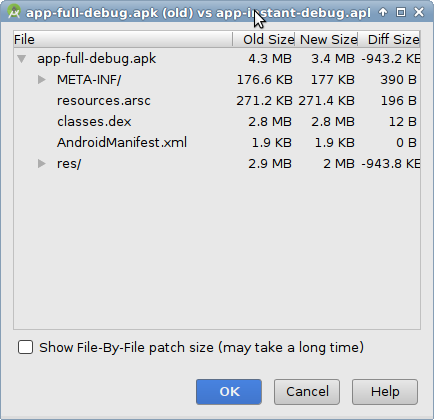
You can also compare different builds with APK Analyzer tool, and it works with instant APKs, too.

Finally, review the list of transitive dependencies and exclude the ones you do not need. Use the following command to review the dependencies graph: gradle -q :MODULE:dependencies --configuration compile. Further details can be found in the Gradle documentation.

Other tips

Android Studio 3.0 includes the App Links Assistant tool, which can help to generate the necessary intent filters, and help in splitting the project into several modules. [3]

Once you got the instant app bundles under the size limit, it is the time to make sure the building process is up to date. Check that the application package and instant app APKs are signed using the "APK Signature Scheme v2". If you sign the APKs using the latest version of the SDK tools, everything should be done automatically. However, if you manually sign the build artifacts you need to avoid using jarsigner and switch to apksigner instead.

And a few useful tips for adapting the app's code to the instant runtime environment. Keep in mind that having a small branches of code for instant/installable applications, based on the InstantApps.isInstantApp(...), should be fine and typically does not make the source code unreadable (unless you abuse it, of course). Also, when using share intents make sure the code does not explicitly enumerate applications installed on the device, instant app security model does not allow that. Simply use regular Intent.createChooser() to present the list of all possible actions to the user.

The level of effort of developing an instant app for an existing Android application varies across developers and is heavily dependent on how your application is organized today. For some, it will be easy as your project is already organized as multiple modules. However, for some, the focus will be on reducing the code and resource assets size, and we have introduced tools and Android platform features above to help you with that.

Hear from other developers using Android Instant Apps

Finally, check out these great posts by developers that have already built an instant app:

Visit the Android Developers website to get started with Android Instant Apps and check out more instant apps success stories from other developers.

Read more

8/15/17

Build a subscriptions business on Google Play with these new features and best practices

Posted by Tom Grinsted, Product Manager

Subscriptions can be a sustainable source of revenue, allowing you to invest in your long-term business growth with confidence. Subscription apps are growing rapidly on Google Play; the number of subscribers doubled in the last year and spend on subscriptions has increased 10-times over the past three years. To help the growing number of subscription businesses we're seeing, we href="https://www.youtube.com/watch?v=hRZPXgRhOH0">introduced the subscriptions dashboard in the Google Play Console at I/O 2017. Today, we're adding three new subscription reports covering acquisition, retention, and cancellations to help you understand your data and make informed business decisions. Find information below on the new features, our updated best practices to help you grow your subscriptions business, and stories from other developers succeeding on Google Play.

New subscription reports now available in the Google Play Console

Three new subscription reports in the Google Play Console

The acquisition report enables you to evaluate different acquisition channels, including Adwords and UTM-tagged campaigns. This can help you identify which channels and campaigns are the most successful in acquiring new subscribers.

The retention report displays the lifetime retention of a customized cohort of your subscribers. It allows you to easily compare different subscription products, plots key events such as the end of a free trial, and provides forecasts to enable you to make decisions faster.

Finally, the cancellations report. This detailed cancellation data shows when a user cancels, either voluntarily (such as when they choose to cancel) or involuntarily (for example, when there is payment failure). You can also see whether the cancellation was accompanied by the person uninstalling.

We're continually working to improve the Google Play Console. If you have ideas or feedback on how we can improve the subscriptions features, href="https://docs.google.com/forms/d/e/1FAIpQLSdyg0eVD2oBGXDAt637IT6W4eumyCWUV1apht-KhxtEQ8TOhQ/viewform">please let us know.

Take advantage of the new Google Play Billing Library

To benefit from these features, you need to be using Google Play Billing as the payment method for subscriptions in your app. Implementing Play Billing is easy with the href="https://android-developers.googleblog.com/2017/06/money-made-easily-with-new-google-play.html">new Google Play Billing Library. We've also updated Play Billing so the billing permission will be enforced when the buyer tries to initiate a purchase rather than when you publish your app. This means you can publish a single APK in both Play Billing supported and non-supported countries (rather than maintaining a separate APK that does not use the Billing permission for non-supported countries). Remember to href="https://support.google.com/googleplay/android-developer/answer/1153481?hl=en&ref_topic=3452890">check first if billing is supported before trying to offer any in-app purchases.

Become a 'subscriptions first' company and succeed on Google Play

As developers become more sophisticated with their subscriptions offerings on Google Play, our most successful partners have learned a lot about what does and doesn't work well. Niko Schröer, a partner manager with expert knowledge of subscription apps, has a new post on Medium to help you href="https://medium.com/googleplaydev/building-a-subscriptions-business-for-all-seasons-7ffd95b3f929">become a successful subscriptions company. In the post, you'll find a link to our detailed href="http://services.google.com/fh/files/misc/subscription_apps_on_google_play.pdf">user research on Android subscribers [PDF] published in June 2017, which offers helpful insights into what users look for in a subscription product. We've also published some href="https://developer.android.com/distribute/best-practices/earn/subscriptions.html">new best practices on subscriptions, which you can read along with other tips to succeed on Google Play in the Playbook app.

How other developers are succeeding with subscriptions on Play

Viki, a Singapore based video app, uses subscriptions to build a sustainable and predictable revenue stream, allowing them to invest in original content and provide better premium experiences for their users. Total revenue from subscriptions grew over 200% over the year, and by 700% in emerging markets like the Middle East and Latin America. Watch Alex Chan, Senior VP of Product and Engineering at Viki, tell the story.

The developer of Anghami, a popular music service in the Middle East and North Africa, increased the number of subscribers in their app with user interface experiments and href="https://support.google.com/googleplay/android-developer/answer/140504#intro">introductory pricing. During one promotional period, Anghami used introductory pricing to increase new sign-ups by 400% compared to their average daily sign-ups. Find out more about how Anghami achieves subscription success.

How useful did you find this blogpost?
href="https://docs.google.com/forms/d/e/1FAIpQLScLTlzFd_aV-3rAdBqO1QxwCsuAcDCIM6fJFXyNcyf7zElVXg/viewform?usp=pp_url&entry.753333049=1%E2%98%85+%E2%80%93+Not+at+all&entry.2056663615&entry.646747778=subsExtraReports-08/17" style=color:gold; >★ href="https://docs.google.com/forms/d/e/1FAIpQLScLTlzFd_aV-3rAdBqO1QxwCsuAcDCIM6fJFXyNcyf7zElVXg/viewform?usp=pp_url&entry.753333049=2%E2%98%85+%E2%80%93+Not+very&entry.2056663615&entry.646747778=subsExtraReports-08/17" style=color:gold; >★ href="https://docs.google.com/forms/d/e/1FAIpQLScLTlzFd_aV-3rAdBqO1QxwCsuAcDCIM6fJFXyNcyf7zElVXg/viewform?usp=pp_url&entry.753333049=3%E2%98%85+%E2%80%93+Somewhat&entry.2056663615&entry.646747778=subsExtraReports-08/17" style=color:gold; >★ href="https://docs.google.com/forms/d/e/1FAIpQLScLTlzFd_aV-3rAdBqO1QxwCsuAcDCIM6fJFXyNcyf7zElVXg/viewform?usp=pp_url&entry.753333049=4%E2%98%85+%E2%80%93+Very&entry.2056663615&entry.646747778=subsExtraReports-08/17" style=color:gold; >★ href="https://docs.google.com/forms/d/e/1FAIpQLScLTlzFd_aV-3rAdBqO1QxwCsuAcDCIM6fJFXyNcyf7zElVXg/viewform?usp=pp_url&entry.753333049=5%E2%98%85+%E2%80%93+Extremely&entry.2056663615&entry.646747778=subsExtraReports-08/17" style=color:gold; >★
Read more

8/4/17

How we’re helping people find quality apps and games on Google Play

Posted by Andrew Ahn, Product Manager, Google Play

People enjoy using apps and games which meet their performance and quality expectations. Excessive battery usage, slow render times, and crashes, on the other hand, can be a source of frustration. In fact, in an internal analysis of app reviews on Google Play, we noticed that half of 1-star reviews mentioned app stability. Developers who focus on app quality can see improvements in their rating, and ultimately their retention and monetization.

As part of our continued effort to deliver the best possible Google Play experience, we recently enhanced our search and discovery algorithms to reflect app quality. This results in higher quality apps being surfaced in the Play Store more than similar apps of lower quality (eg: apps that exhibit more frequent crashes). The change has had a positive impact on engagement -- we've seen that people go on to use higher quality apps more and uninstall them less.

Developers focusing on performance can use the Play Console to help find and fix a number of quality issues. href="https://android-developers.googleblog.com/2017/07/android-vitals-increase-engagement-and.html">Android vitals identifies key performance issues, reported by opted-in devices which have your app installed, so you can address them. The href="https://developer.android.com/distribute/best-practices/develop/test-your-app.html">pre-launch report shows you the result of testing your alpha or beta app on popular physical devices so you can catch issues before launching updates. Also, href="https://developer.android.com/distribute/best-practices/engage/user-reviews.html">ratings and reviews can provide additional insights related to app quality, directly from people using your app. To see the positive effect this can have, find out how Busuu increased their rating from 4.1☆ to 4.5☆ by focusing on app performance.

Google Play strives to help people find and discover safe, high quality, useful, and relevant apps. By focusing on the quality and performance of your app, you'll find more success on Google Play. For more tips and best practices to grow your app or game business, href="https://play.google.com/store/apps/details?id=com.google.android.apps.secrets&utm_source=shorturl&utm_medium=shorturl&utm_campaign=gcoplayplaybook">get the Playbook app.

How useful did you find this blogpost?

href="https://docs.google.com/forms/d/e/1FAIpQLScLTlzFd_aV-3rAdBqO1QxwCsuAcDCIM6fJFXyNcyf7zElVXg/viewform?usp=pp_url&entry.753333049=1%E2%98%85+%E2%80%93+Not+at+all&entry.2056663615&entry.646747778=vitalrank-07/17" style="color:gold;">★ href="https://docs.google.com/forms/d/e/1FAIpQLScLTlzFd_aV-3rAdBqO1QxwCsuAcDCIM6fJFXyNcyf7zElVXg/viewform?usp=pp_url&entry.753333049=2%E2%98%85+%E2%80%93+Not+very&entry.2056663615&entry.646747778=vitalrank-07/17" style="color:gold;">★ href="https://docs.google.com/forms/d/e/1FAIpQLScLTlzFd_aV-3rAdBqO1QxwCsuAcDCIM6fJFXyNcyf7zElVXg/viewform?usp=pp_url&entry.753333049=3%E2%98%85+%E2%80%93+Somewhat&entry.2056663615&entry.646747778=vitalrank-07/17" style="color:gold;">★ href="https://docs.google.com/forms/d/e/1FAIpQLScLTlzFd_aV-3rAdBqO1QxwCsuAcDCIM6fJFXyNcyf7zElVXg/viewform?usp=pp_url&entry.753333049=4%E2%98%85+%E2%80%93+Very&entry.2056663615&entry.646747778=vitalrank-07/17" style="color:gold;">★ href="https://docs.google.com/forms/d/e/1FAIpQLScLTlzFd_aV-3rAdBqO1QxwCsuAcDCIM6fJFXyNcyf7zElVXg/viewform?usp=pp_url&entry.753333049=5%E2%98%85+%E2%80%93+Extremely&entry.2056663615&entry.646747778=vitalrank-07/17" style="color:gold;">★
Read more

7/11/17

Calling all indie developers in the US & Canada: sign up for the Google Play Indie Games Festival in San Francisco

Posted by Jamil Moledina, Games Strategic Lead, Google Play

Calling all indie developers with fun and creative mobile games: we want to see your latest work! We'll be back with the second Google Play Indie Games Festival taking place in San Francisco on September 23rd.

If you're an indie developer based in the US or Canada and want to submit your game, visit the submission form and enter now through August 6th at 11:59PM PST.

If chosen as one of the 20 Finalists, you could have a chance to demo your game at the event and compete for prizes and bragging rights, to go home as one of the three festival winners!

How useful did you find this blogpost?
href="https://docs.google.com/forms/d/e/1FAIpQLScLTlzFd_aV-3rAdBqO1QxwCsuAcDCIM6fJFXyNcyf7zElVXg/viewform?usp=pp_url&entry.753333049=1%E2%98%85+%E2%80%93+Not+at+all&entry.2056663615&entry.646747778=SFindiefest-07/17" style="color:gold;">★ href="https://docs.google.com/forms/d/e/1FAIpQLScLTlzFd_aV-3rAdBqO1QxwCsuAcDCIM6fJFXyNcyf7zElVXg/viewform?usp=pp_url&entry.753333049=2%E2%98%85+%E2%80%93+Not+very&entry.2056663615&entry.646747778=SFindiefest-07/17" style="color:gold;">★ href="https://docs.google.com/forms/d/e/1FAIpQLScLTlzFd_aV-3rAdBqO1QxwCsuAcDCIM6fJFXyNcyf7zElVXg/viewform?usp=pp_url&entry.753333049=3%E2%98%85+%E2%80%93+Somewhat&entry.2056663615&entry.646747778=SFindiefest-07/17" style="color:gold;">★ href="https://docs.google.com/forms/d/e/1FAIpQLScLTlzFd_aV-3rAdBqO1QxwCsuAcDCIM6fJFXyNcyf7zElVXg/viewform?usp=pp_url&entry.753333049=4%E2%98%85+%E2%80%93+Very&entry.2056663615&entry.646747778=SFindiefest-07/17" style="color:gold;">★ href="https://docs.google.com/forms/d/e/1FAIpQLScLTlzFd_aV-3rAdBqO1QxwCsuAcDCIM6fJFXyNcyf7zElVXg/viewform?usp=pp_url&entry.753333049=5%E2%98%85+%E2%80%93+Extremely&entry.2056663615&entry.646747778=SFindiefest-07/17" style="color:gold;">★
Read more
loading...